
At EasyPeasy, we know that every child is different, and parenting more than one little one under five often means juggling very different routines, personalities, milestones and challenges all at once. That’s why we’re excited to introduce one of our most requested new features from parents and caregivers using the EasyPeasy app: multiple child profiles.
Parents and caregivers can now add up to three children to their EasyPeasy account and receive personalised content, tips, advice and playful learning ideas tailored to each child individually. Whether you’re supporting a baby, toddler and preschooler all at the same time, or navigating different routines and developmental stages with your children, EasyPeasy can now support your whole family in one place.

Update your app today and explore the new multiple children functionality—because every child deserves the best start in life.
What's new?
With our new multiple children feature, you can now:
- Add up to three child profiles to your EasyPeasy account
- Receive age-specific content and recommendations for each child
- Personalise your content feed based on your parenting goals and interests
- Access tailored tips, advice and playful activities for each of your little ones
- Set different preferences and support needs for different children
- Easily switch between children’s personalised content feeds within the app
Until now, parents and caregivers could only register one child profile on EasyPeasy. This update means families with multiple children aged 0-5 can now enjoy a more personalised experience designed around the needs of each child.
Personalised support for every child
Every child develops in their own way, and every family’s journey is unique. When adding a child profile, you can personalise your recommendations by telling us what you’d like to learn more about for each child, including topics such as building emotional confidence and resilience, creating strong routines, supporting communication and language, encouraging play and learning at home, and preparing for nursery or school.
You can also tell us about any parenting challenges you’re currently experiencing, including things like making mealtimes easier and more enjoyable, leaving the house more smoothly, supporting children through big feelings and emotions, or managing routines and transitions
These preferences can be updated at any time in your profile settings, and you can choose different topics and support areas for each child.
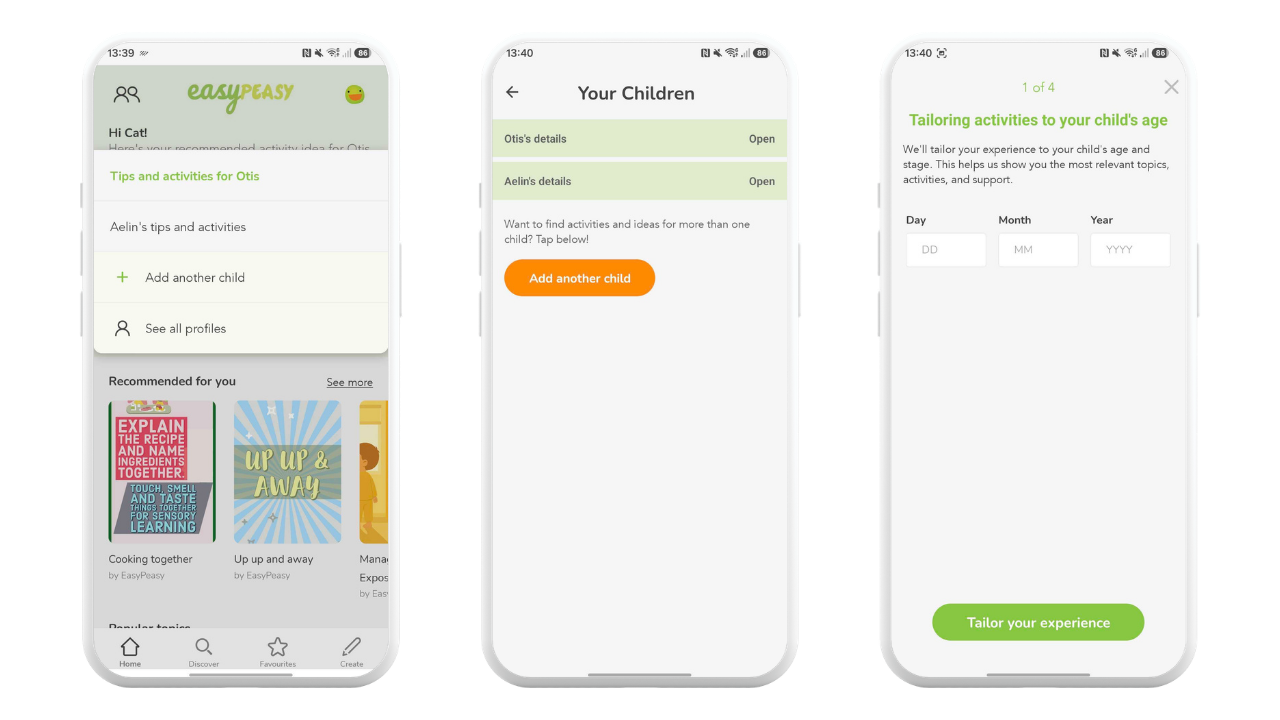
How to add another child profile
Getting started is simple. To add another child profile to your EasyPeasy account, just:
- Open the EasyPeasy app
- Tap the children icon in the top left corner of your home screen
- Select “Add another child”
- Enter your child’s details, including their name, birth date, biological sex, and prematurity status
- Personalise your content preferences for your child
If you are new to EasyPeasy and setting up an account for the first time, you can simply select "Add another child" during your registration and follow the steps to provide your child's details and your content preferences.
Once added, you can easily switch between your children’s personalised content feeds at any time using the children icon on your home screen.
Supporting every family's journey
We’re delighted to bring this feature to our community of parents and caregivers, and we can’t wait to see families enjoying even more playful, educational and connected moments together at home. Don’t forget that parents and carers can also now benefit from our Special Educational Needs (SEN) content adaptations within the app, helping make our activities and support even more inclusive for all families.
We’re proud to be part of your parenting journey, and we’re always working to do more to support families with young children. Keep an eye out for more updates coming soon and, as always, we’d love to hear what you think.
Explore the EasyPeasy app today
If you already have the EasyPeasy app, make sure you update to the latest version through your device’s app settings to access the new feature.
If you’re new to EasyPeasy, you can download the app today from the iOS App Store or Google Play Store and create your free account to get started.

|

|